
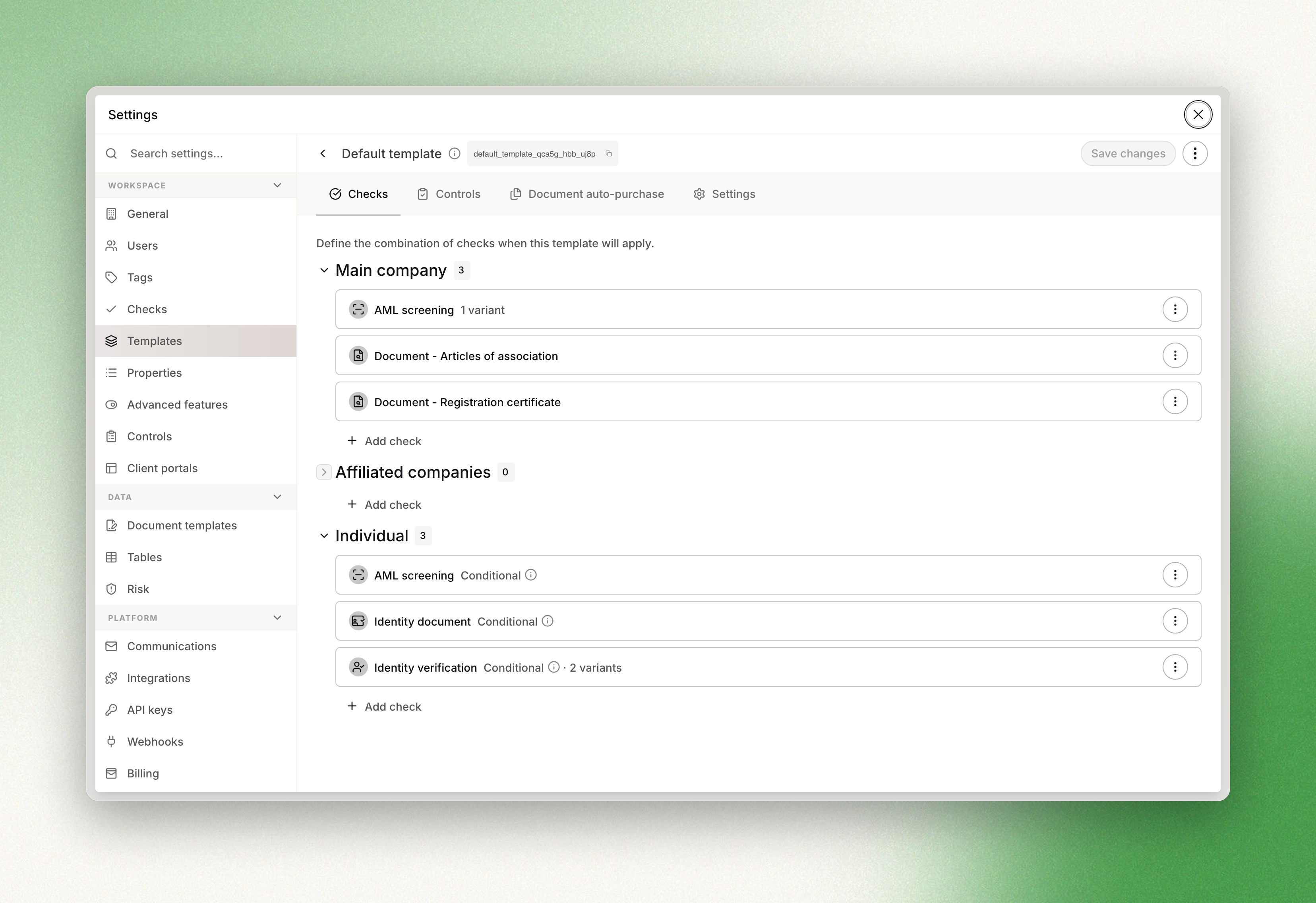
A template defines which checks run on the entities of a case: on the main company, on its
affiliated companies, and on the individuals attached to them. A case with a template attached
receives its checks automatically; checks are not created one by one.
Templates are configured in the console. The API lists them, attaches one to a case, and runs
one. It does not create or modify them.
Identifying a template
Every template has a key: lowercase letters, digits and underscores, beginning with a letter,
unique within the workspace, 100 characters maximum. The console derives it from the template
name and allows it to be edited until the template is first saved. After that the key is
immutable, which is what makes it the identifier to use over the API.
template_id is accepted wherever template_key is, but it is deprecated, and the two
cannot be sent in the same request.
List all templates returns the templates of a workspace:
curl -G https://api.dotfile.com/v1/templates \
  -H "X-DOTFILE-API-KEY: $DOTFILE_API_KEY" \
-d "key.eq=kyb_standard"| Field | Description |
|---|---|
id | UUID v4 |
name | Display name |
key | Stable identifier, immutable after creation |
description | Optional string, 280 characters maximum |
case_auto_approval | Whether the template approves cases automatically |
created_at, updated_at | Timestamps |
Filtering is available on name and key (eq, not_eq, like, ilike),
case_auto_approval, created_at and updated_at. Sorting is available on name,
created_at and updated_at, defaulting to updated_at ascending. See
Filtering, sorting and pagination.
The rules of a template are not exposed by the API.
GET /v1/templatesreports that a
template exists and whether it auto-approves; it does not report which checks it configures,
on which targets, or under which conditions. Retrieve a template takes
anidrather than a key, so resolving a key means filtering the list, as in the call above.
Attaching a template to a case
| Route | Field |
|---|---|
| Create a case | template_key |
| Update a case | template_key. null detaches the template |
| The console | Case creation and case edition |
An unknown key returns 404: code TEMPLATE_KEY_NOT_FOUND on case creation,
NOT_FOUND_TEMPLATE_KEY on case update and on a template run.
Check creation
Automatic
The template of a case is re-evaluated whenever the case changes: a company or an individual
created or updated, a check status changing, an AML hit reviewed, a control completed. No call
is required: adding an entity is what produces its checks.
Each rule of a template has one target, and creates its check on every entity of the case that
matches it.
| Target | Entities matched |
|---|---|
company_main | The main company |
company_affiliated | Every affiliated company |
individual_any | Every individual |
Rules are conditional. A rule, and each of its variants, carries activation logic evaluated
against the case and the entity, which is how a check restricted to beneficial owners or to
companies of a given country is expressed: the target remains individual_any or
company_affiliated, and the condition performs the narrowing. Templates also assign controls
and trigger document purchases through the same mechanism.
Two constraints apply to every run:
- An existing check is never re-created or reset. When the entity already carries a check of the
same type and subtype, the rule is skipped and the existing check is kept, whatever its status. - Cases in
draft,rejectedorclosedrun no automation. A company added to a draft case
receives its checks once the case reachesopen.
When the template's Merge identity checks setting is enabled, an individual matched both by a
rule creating an id_verification check and by a rule creating an id_document check receives
the id_verification check only. The setting is disabled by default and applies to that pair
alone.
Manual
Run a template applies a template to a case on demand.
curl -X POST https://api.dotfile.com/v1/templates/run \
  -H "X-DOTFILE-API-KEY: $DOTFILE_API_KEY" \
  -H "Content-Type: application/json" \
  -d '{"case_id": "'$CASE_ID'", "template_key": "kyb_enhanced"}'
case_id is required. template_key is optional and changes the behaviour of the call:
| Request | Behaviour |
|---|---|
case_id only | The template currently attached to the case is applied again |
case_id and template_key | The template of the case is changed to that one, then applied. This writes to the case |
The call is synchronous: it waits for the run to complete, then returns case_id, company_ids
and individual_ids — the entities to re-read, not the checks that were created. Retrieve them
with Retrieve a case, or subscribe to Check.Started in
Webhooks.
A case in draft returns 400 (AUTOMATION_PIPELINE_DRAFT_CASE).
Deleting a check created by a template records that deletion, so that automation does not
immediately re-create it.POST /v1/templates/runclears those records for the whole case,
and a deleted check is therefore re-created on the next run. No option suppresses this.
Auto approval
case_auto_approval is enabled by default on a new template. When it is enabled, a case using
that template is approved automatically once all of the following hold:
- the case is
open; - every check on every entity of the case is approved, and there is at least one, so a case
without checks never auto-approves; - every control on the case is completed.
The approval is a case review, identical to one created through
Create a case review: Case.ReviewConfirmed is emitted and
next_review_at is derived from workspace settings and the case risk level.
Adding a check to an approved case does not reopen it by default. The case has to be reopened,
after which approval of the new check triggers auto approval again. A template can be configured
in the console to reopen approved cases when a check is no longer approved or a control is no
longer completed. That setting, and automatic rejection on prohibited risk, are not exposed by
the API.
Related
- The Case object — statuses, custom properties, relations, risk
- Checks — what each check type verifies and returns
- Start KYB process — the end-to-end integration flow