
A KYC process is the same object as a KYB one — a case — with one individual in it instead of
a company and its ownership chain. Which makes it the shorter guide: there is no registry to
query, so the case is created, the checks run, and you collect what only the person can give you.
Requests carry your key in the X-DOTFILE-API-KEY header, against https://api.dotfile.com/v1.
See Authentication.
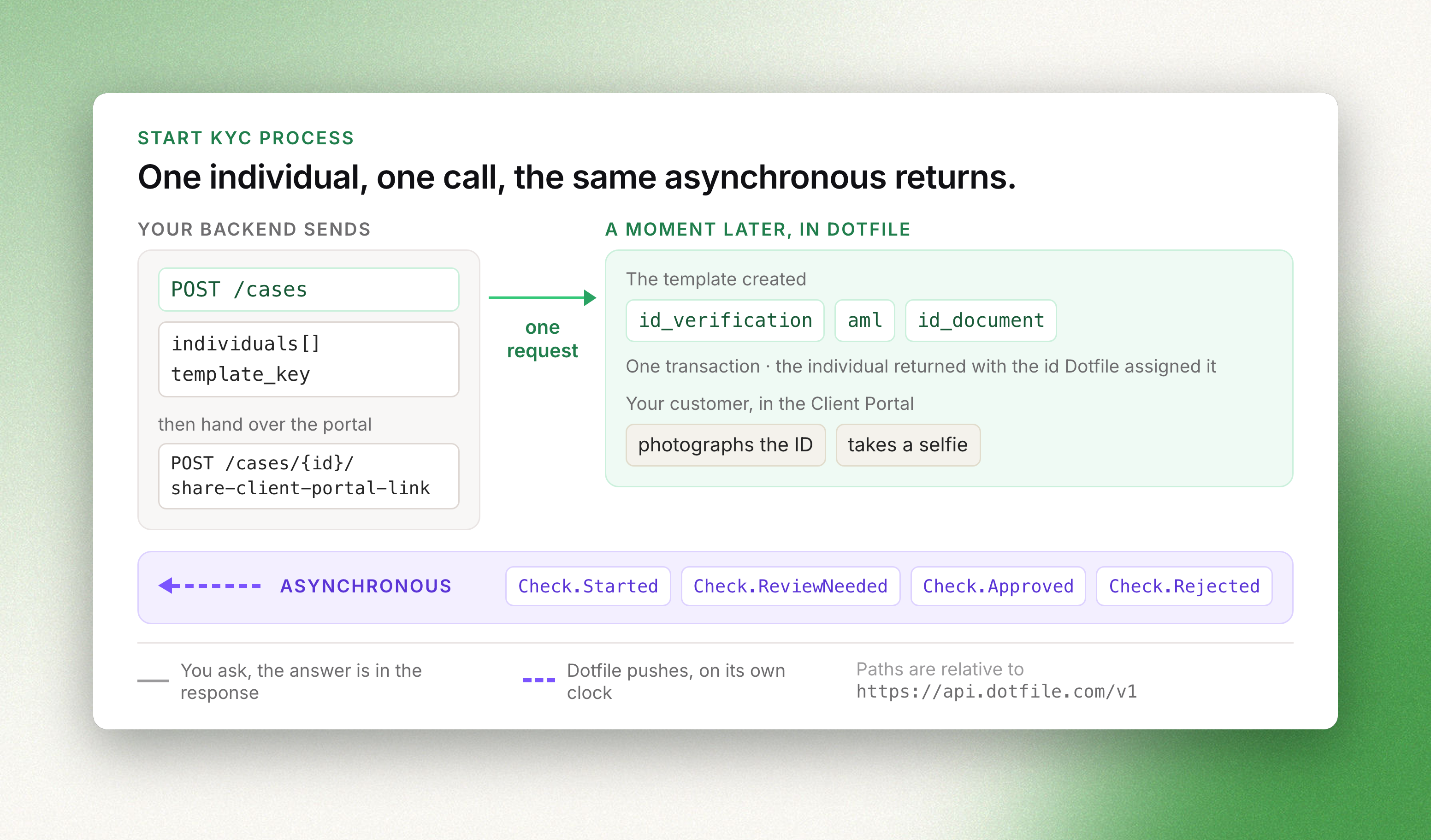
1 — Create the case and the individual in one call
Create a case takes the individual in its body, and template_key creates
the checks that apply to them:
curl -X POST https://api.dotfile.com/v1/cases \
  -H "X-DOTFILE-API-KEY: $DOTFILE_API_KEY" \
  -H "Content-Type: application/json" \
  -d '{
    "name": "Jane Doe onboarding",
    "external_id": "customer_8412",
    "template_key": "kyc_standard",
    "individuals": [
      {
        "first_name": "Jane",
        "last_name": "Doe",
        "email": "[email protected]",
        "birth_date": "1980-04-12",
        "birth_country": "FR",
        "nationalities": ["FR"],
        "is_business_contact": true
      }
    ]
}'emailis required whenis_business_contactistrue, which is what makes the person
reachable — for the client portal, and for the checks that send them somewhere.external_idis your own identifier, unique per workspace, and works in place of the case
id when reading the case back.- The response is the complete case, with the id Dotfile assigned to the individual. No
follow-up call to learn it.
A case does not need a company: companies is simply omitted. Everything else — templates,
custom properties, tags, spaces, risk — behaves exactly as it does on a KYB case.
2 — Know which checks apply to a person
The template decides which ones run, but not every check type can target an individual:
| Check | Individual | Company |
|---|---|---|
| Identity verification, ID document, eKYC, electronic signature | yes | no |
| AML screening, document, fraud database | yes | yes |
| Online reputation, company monitoring | no | yes |
So a KYC template built on identity verification and AML screening covers the usual case;
Checks documents what each one verifies and returns.
3 — Collect what only the person can give
An identity verification needs their document and their face; a proof of address needs their
document. That collection happens through the
Client Portal, or through your own front-end
against the API.
curl -X POST https://api.dotfile.com/v1/cases/$CASE_ID/share-client-portal-link \
  -H "X-DOTFILE-API-KEY: $DOTFILE_API_KEY" \
  -H "Content-Type: application/json" \
  -d '{"business_contact_id": "'$INDIVIDUAL_ID'"}'
The individual must belong to the case, be relevant, and have an email address; the client portal
must be online. Marking them is_business_contact at creation is what makes them eligible.
4 — Receive the results
Subscribe to Check.Started, Check.Approved, Check.Rejected, Check.ReviewNeeded and
Check.Expired, plus Case.RiskUpdated and Case.StatusUpdated — see
Webhooks. Or read the case: Retrieve a case returns the
individual with their checks embedded, by case id or by your external_id.
Check.ReviewNeeded is the one that matters operationally. It means the provider could not decide
on its own — a blurred document, a partial match against a sanctions list — and a judgement is
needed.
5 — Review, then decide
That judgement can be recorded either way. In the console, where a reviewer sees the evidence
side by side. Or by API, per check type:
curl -X PATCH https://api.dotfile.com/v1/checks/id_verification/$CHECK_ID/review \
  -H "X-DOTFILE-API-KEY: $DOTFILE_API_KEY" \
  -H "Content-Type: application/json" \
  -d '{"action": "approve", "comment": "Document legible on second submission"}'
action is approve or reject; override: true changes a decision already made. Each check
type carries the endpoint under its own path — checks/aml, checks/id_document, checks/ekyc,
checks/fraud_database — and AML hits can be reviewed one by one through
checks/aml/{id}/hits/review.
Then close the case with a review:
curl -X POST https://api.dotfile.com/v1/cases/$CASE_ID/reviews \
  -H "X-DOTFILE-API-KEY: $DOTFILE_API_KEY" \
  -H "Content-Type: application/json" \
  -d '{"status": "approved", "comment": "All checks cleared"}'
A template with auto-approval enabled does this for you once every check it created is approved.
Case.ReviewConfirmed tells your system the process is over.
Next
- Start KYB process — the same flow with a company and its ownership chain
- The Case object — statuses, custom properties, relations
- Checks — what each check type verifies and returns