
A KYB process on Dotfile is a case: one company, the companies and people attached to it,
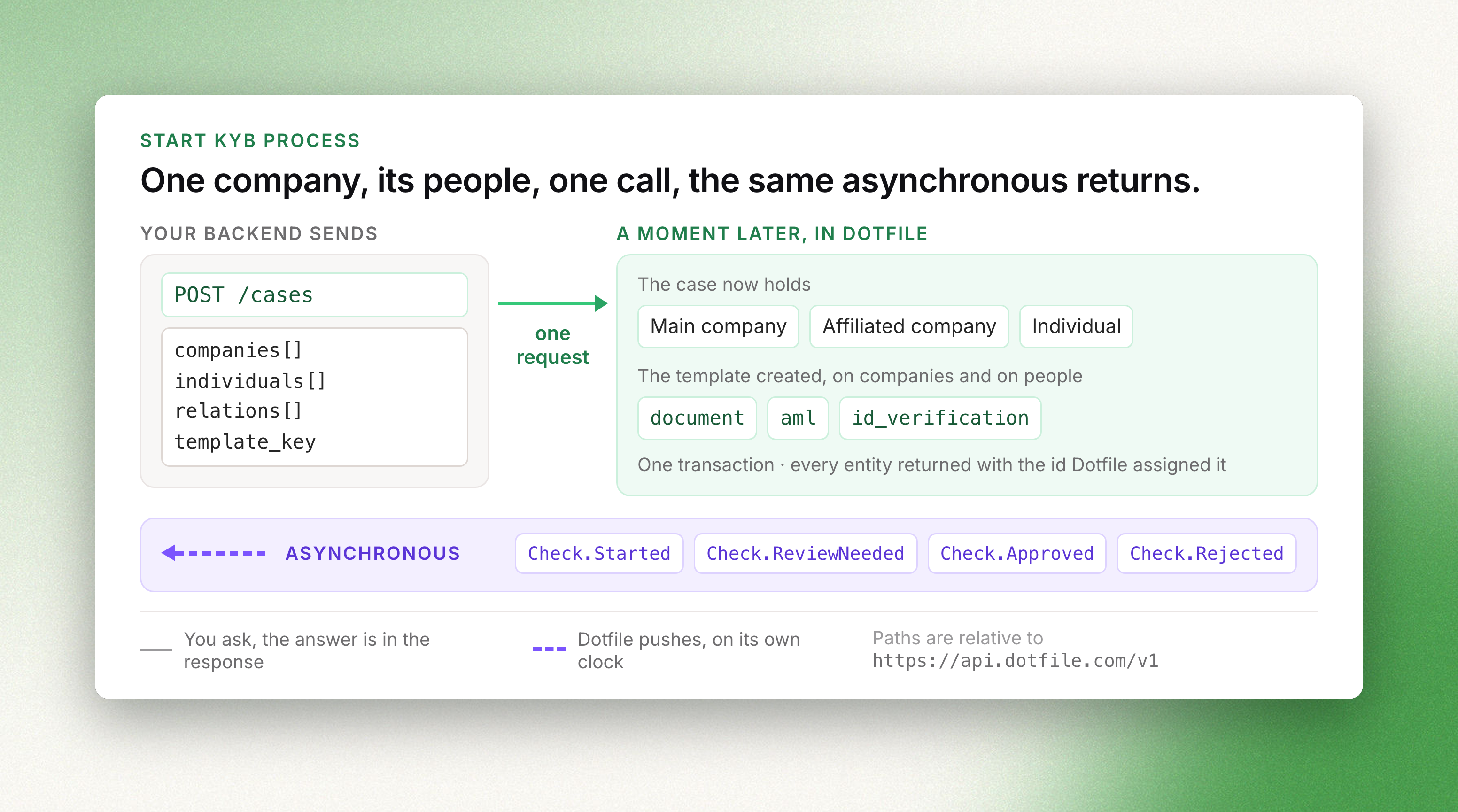
and the checks that verify them. Creating all of it takes one API call. What follows is
collecting what you do not have yet, and receiving the results.
This guide assumes you have an API key and a template. Every request carries your key in the
X-DOTFILE-API-KEY header, against https://api.dotfile.com/v1. See
Authentication.
1 — Identify the company
Skip this step if you already hold the company's country and registration number: pass them
straight to the case and Dotfile fetches the rest.
Otherwise, ask your user for a country and a name, and call
Search companies:
curl -G https://api.dotfile.com/v1/company-data/search \
  -H "X-DOTFILE-API-KEY: $DOTFILE_API_KEY" \
  -d country=FR -d name="Dotfile"
Search returns several candidates, and that is not a defect. Two companies can share a
name, in the same country, in the same registry. Nothing downstream can pick the right one for
you — so either your user selects from the list, or you match on a registration number you
already trust. Never take the first result blindly: you would be onboarding a company your
customer never named.
Each result carries a search_ref. Fetch company data turns it into
the full profile — legal form, address, classifications, shareholders and officers:
curl https://api.dotfile.com/v1/company-data/fetch/$SEARCH_REF \
  -H "X-DOTFILE-API-KEY: $DOTFILE_API_KEY"
Countries covered by your workspace's providers are listed by
List countries.
2 — Create the case, its entities and its checks in one call
Create a case accepts the whole graph in its body: the main company, its
affiliated companies, the individuals, and the relations between them. Entities reference each
other inside the same payload through ref — no identifier exists yet, so you invent your own
and Dotfile resolves them.
curl -X POST https://api.dotfile.com/v1/cases \
  -H "X-DOTFILE-API-KEY: $DOTFILE_API_KEY" \
  -H "Content-Type: application/json" \
  -d '{
    "name": "Acme Corp onboarding",
    "external_id": "customer_8412",
    "template_key": "kyb_standard",
    "companies": [
      {
        "ref": "main-co",
        "type": "main",
        "name": "Acme Corp",
        "country": "FR",
        "registration_number": "552100554"
      },
      {
        "ref": "holding",
        "type": "affiliated",
        "name": "Acme Holding",
        "country": "LU",
        "registration_number": "B123456",
        "relations": [
          {
            "source_company_ref": "main-co",
            "roles": ["shareholder"],
            "ownership_percentage": 80
          }
        ]
      }
    ],
    "individuals": [
      {
        "ref": "ceo",
        "first_name": "Jane",
        "last_name": "Doe",
        "email": "[email protected]",
        "birth_date": "1980-04-12",
        "is_business_contact": true,
        "is_beneficial_owner": true,
        "relations": [
          {
            "source_company_ref": "main-co",
            "roles": ["legal_representative", "shareholder"],
            "ownership_percentage": 20,
            "position": "CEO"
          }
        ]
      }
    ]
  }'
Four things worth knowing about this payload:
template_keycreates the checks. The template decides which checks run on the company
and on each individual, based on the rules you configured. You do not create checks one by
one — see Templates.rolesdescribes a relation, and takeslegal_representativeorshareholder. Being a
beneficial owner is a property of the person, not of the relation: it is the
is_beneficial_ownerflag, alongsideis_controlling_person,is_signatory,is_delegator
andis_business_contact.source_company_refnames the company at the other end of the relation. Omit it and the
case's main company is used, which is what you want most of the time.external_idis your own identifier, unique per workspace. It also works in place of the
case id when reading a case back, so you never have to store ours.
The response is the complete case: its id, and every company and individual with the ids
Dotfile assigned them. No follow-up call is needed to learn what was created.
Coming from the older four-call sequence?
Creating the case first, then posting each company and individual against its id, still works
and is not deprecated — Create a company and
Create an individual take acase_id. Nested creation is simply
fewer round-trips and fewer partial failures: the whole graph is written in one transaction,
or none of it is.
3 — Collect what the registry does not hold
Registries give you the structure. They do not give you a proof of address, a signed document,
or a selfie. That comes from your customer, through the
Client Portal — either the hosted one or your own
front-end feeding the API.
To hand a customer their portal, generate an authenticated link:
curl -X POST https://api.dotfile.com/v1/cases/$CASE_ID/share-client-portal-link \
  -H "X-DOTFILE-API-KEY: $DOTFILE_API_KEY" \
  -H "Content-Type: application/json" \
  -d '{"business_contact_id": "'$INDIVIDUAL_ID'"}'
The individual must belong to the case, be relevant, and have an email address; the client
portal must be online. Marking someone is_business_contact at creation, as in the payload
above, is what makes them eligible.
4 — Receive the results
Checks are asynchronous — a screening takes seconds, a document review can take a person. Two
ways to follow them, and you want the first:
- Webhooks. Subscribe to
Check.Started,Check.Approved,Check.Rejected,
Check.ReviewNeeded,Check.Expired, and toCase.RiskUpdatedandCase.StatusUpdatedfor
the case itself. Full list and payloads: Webhooks. - Read the case. Retrieve a case returns companies and individuals
with theirchecksembedded, so oneGETgives you the current state of the whole process —
by case id or by yourexternal_id.
Check.ReviewNeeded is the event that matters operationally: it means a provider could not
decide on its own — a blurred document, a name that partially matches a sanctions list — and a
judgement is needed.
That judgement can be recorded either way. In the console, where the document, the extracted
fields and the screening hits are laid out for the reviewer. Or by API, on the check's own path:
curl -X PATCH https://api.dotfile.com/v1/checks/document/$CHECK_ID/review \
  -H "X-DOTFILE-API-KEY: $DOTFILE_API_KEY" \
  -H "Content-Type: application/json" \
  -d '{"action": "approve", "comment": "Certificate matches the registry extract"}'
action is approve or reject, and override: true changes a decision already made. AML hits
can be reviewed one by one through checks/aml/{id}/hits/review. Company monitoring is the
exception: it is read-only over the API.
5 — Decide
When the checks are in, close the case with a review:
curl -X POST https://api.dotfile.com/v1/cases/$CASE_ID/reviews \
  -H "X-DOTFILE-API-KEY: $DOTFILE_API_KEY" \
  -H "Content-Type: application/json" \
  -d '{"status": "approved", "comment": "All checks cleared"}'
comment may be mandatory depending on your workspace settings, and next_review_at is
computed from your settings and the case's risk level unless you override it — which is how
periodic review gets scheduled.
A template with auto-approval enabled does this for you once every check it created is
approved. Either way, Case.ReviewConfirmed tells your system the process is over.
Next
- The Case object — statuses, custom properties, relations on existing entities
- Checks — what each check type verifies and returns
- Start KYC process — the same flow for a single individual
- Filtering, sorting and pagination