
Fraud database
Query fraud-prevention databases to see whether an entity has been flagged before
Introduction
The Fraud Database check queries fraud prevention databases to identify whether a person or entity has been previously flagged for fraudulent activity, adding a layer of protection to your onboarding and due diligence.
Fraud Database screening is essential for regulated entities in the UK that need to check applicants against the National Fraud Database maintained by CIFAS. It catches identity fraud, application fraud and other financial misconduct before it reaches your business.
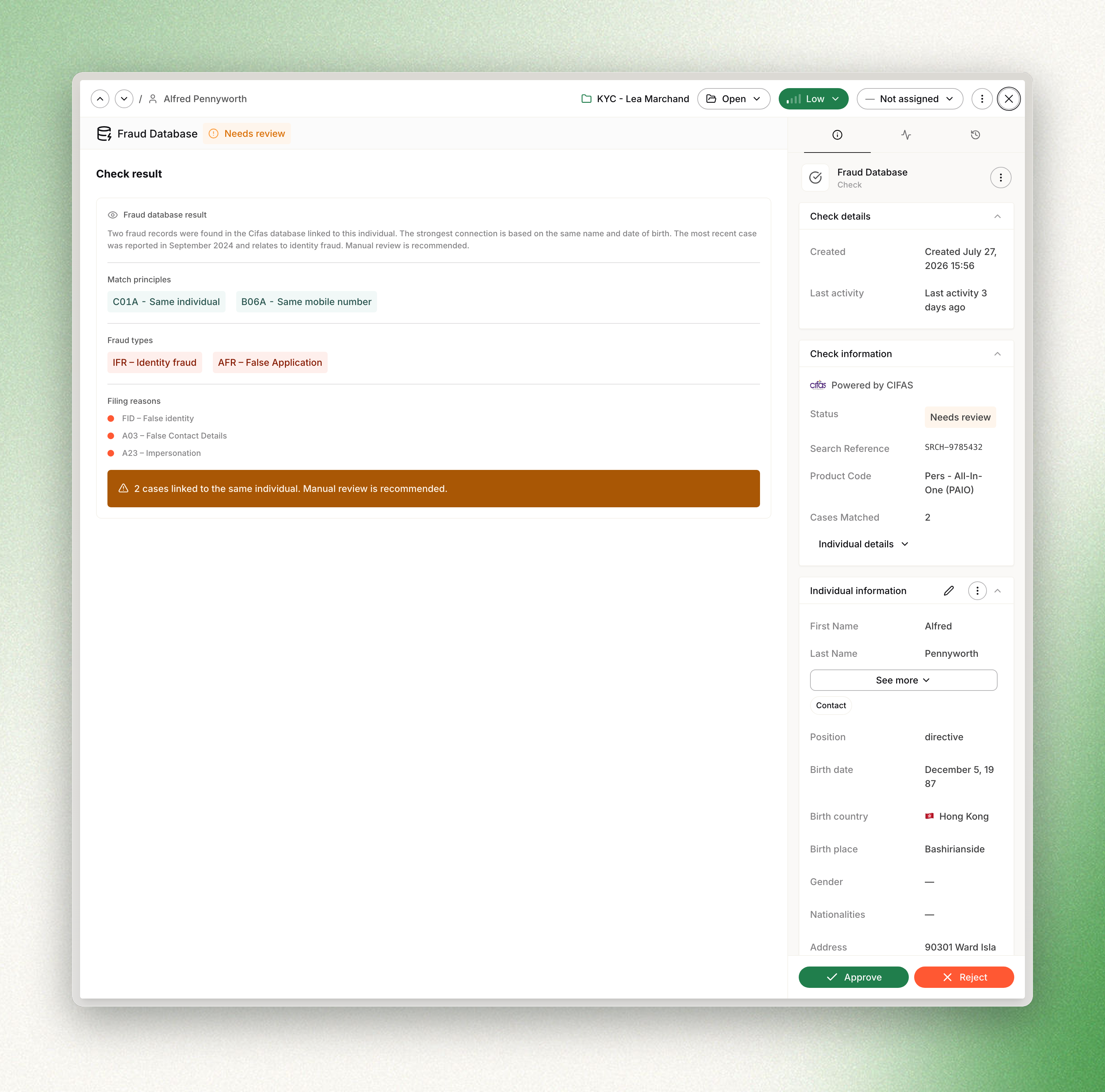
How it works
The Fraud Database check is an internal check — it does not require any end-user interaction. When you launch a check, Dotfile sends the individual's or company's information to the fraud database provider, who searches their records for matches. The result is returned instantly.
- Dual entity support: Unlike most checks that target only individuals, the Fraud Database check supports both individuals and companies, giving you comprehensive fraud screening across all entity types.
- Real-time processing: The check is synchronous, so you get the result as soon as you launch it.
- Match principle transparency: When matches are found, the system shows which data points triggered the match (e.g., same name and date of birth, same address, same phone number).
- Fraud type classification: Each matched case is classified by fraud type (identity fraud, application fraud, facility takeover, etc.) with detailed descriptions.
- Filing reason details: The specific reasons each case was filed are displayed, giving compliance officers full context for their review decision.
- AI-powered interpretation: An AI assistant generates a plain-language analysis of the results, summarizing the findings and recommending an action.
Launching a fraud database check
You can launch a Fraud Database check from any individual or company profile page by adding a new check and selecting Fraud Database. Launching it is a single action, with nothing to configure.
Using templates
Fraud Database checks can be configured in templates and triggered automatically via template activation.
API
Fraud Database checks can be initiated and retrieved by API. You can learn more in our API documentation.
Check results
After launching a Fraud Database check, the result is determined based on whether any matching cases were found in the fraud database:
| Result | Description |
|---|---|
| Approved | No cases were found in the fraud database for this entity. The check is automatically approved. |
| Need Review | One or more cases were found in the fraud database. A compliance officer must review the matches and decide to approve or reject. |
Match details
When cases are found, the check viewer displays:
- Cases matched: The total number of fraud records found.
- Match principles: Badges showing which data points triggered the match. Each code identifies the type of connection found:
| Code | Description |
|---|---|
| C01A | Same individual (exact match on name and date of birth) |
| C02B | Same mobile telephone number |
| C03A | Same email address |
| C04A | Same address |
- Fraud types: Badges classifying each matched case by the type of fraud:
| Code | Description |
|---|---|
| IFR | Identity Fraud |
| AFR | Application Fraud |
| FTF | Facility Takeover Fraud |
| MFR | Misuse of Facility Fraud |
| BIF | Brokerage and Insurance Fraud |
- Filing reasons: Detailed reasons why each case was filed, with colored indicators (e.g., "A03 — False contact details", "B01 — Application in the name of a fictitious person").
Decision logic
The automatic decision follows a simple pattern:
- Approved: No cases found in the fraud database (casesMatched = 0). Nothing to review — the entity has no fraud history.
- Need Review: One or more cases found (casesMatched > 0). Fraud matches always require human review — there is no automatic rejection for this check type.
AI-powered interpretation
Dotfile leverages AI to help compliance officers interpret Fraud Database check results. After each check is processed, the AI assistant generates a natural-language analysis including a summary of the matches found, an interpretation of the match principles and fraud types, and a recommended action.
This analysis is displayed directly in the check viewer, making it faster for compliance teams to process results without having to decode match codes manually.
Provider and settings
CIFAS
Dotfile is partnering with CIFAS for Fraud Database screening. CIFAS maintains the UK National Fraud Database, which is shared across more than 600 member organizations in the UK financial services sector. When a search is performed, CIFAS checks the entity against all filed fraud cases in the database.
Workspace settings
Fraud Database settings are configured at the workspace level in the Settings section:
- Vendor: Currently CIFAS is the only available vendor. Additional fraud database providers may be added in the future.
- Review behavior: The check follows a fixed review pattern — 0 cases is always approved, and any matches always go to Need Review. There are no automatic rejection settings.
Coverage
The Fraud Database check currently covers the United Kingdom through the CIFAS National Fraud Database. The entity must be associated with a UK address or identity for the search to be relevant.
Updated about 1 month ago