
Email & Phone verification
Verify an applicant's email address and phone number, and read the fraud signals behind them
Introduction
Email & Phone verification examines whether the address is valid and the number is live, how long the address and its domain have existed, how often they have been searched recently and by how many organisations.
It is a check of its own. You launch it on an individual, from a template or through the API, and it carries its own status.
How it works
Email & Phone verification is an internal check: no end-user interaction, and the result comes back from a single request to the provider. It runs on individuals only.
- Whichever detail you hold is sent: an individual with only an email address is verified on the email alone, and one with only a phone number on the number alone. With neither, there is nothing to verify and the check cannot be launched.
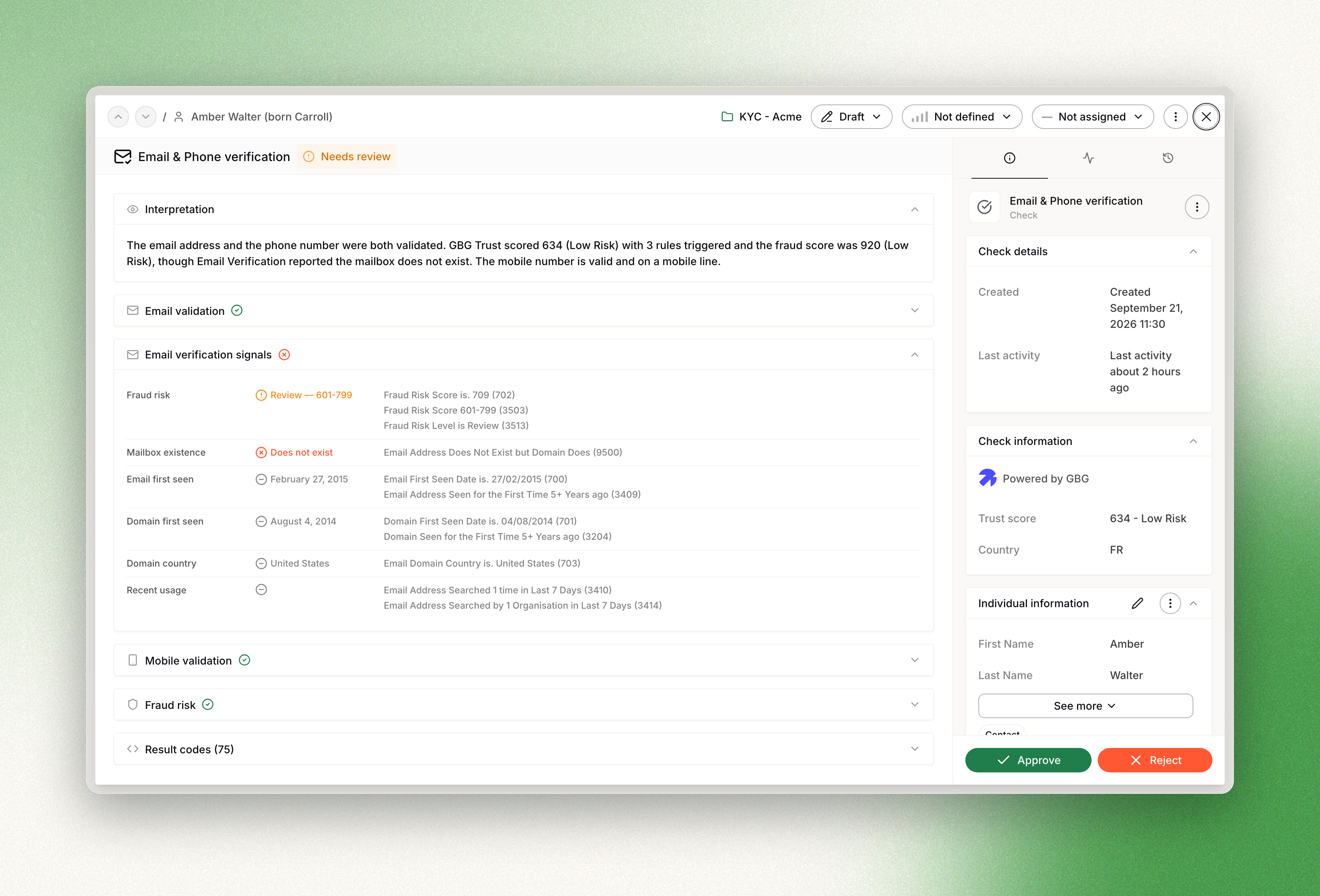
- Four sections on the check page: the signals are grouped into Email validation, Email verification signals, Mobile validation and Fraud risk.
- Every row is evidenced: each row names the provider result codes behind it, and a page-level Result codes list collects them all, so an analyst can justify a decision line by line.
Launching the check
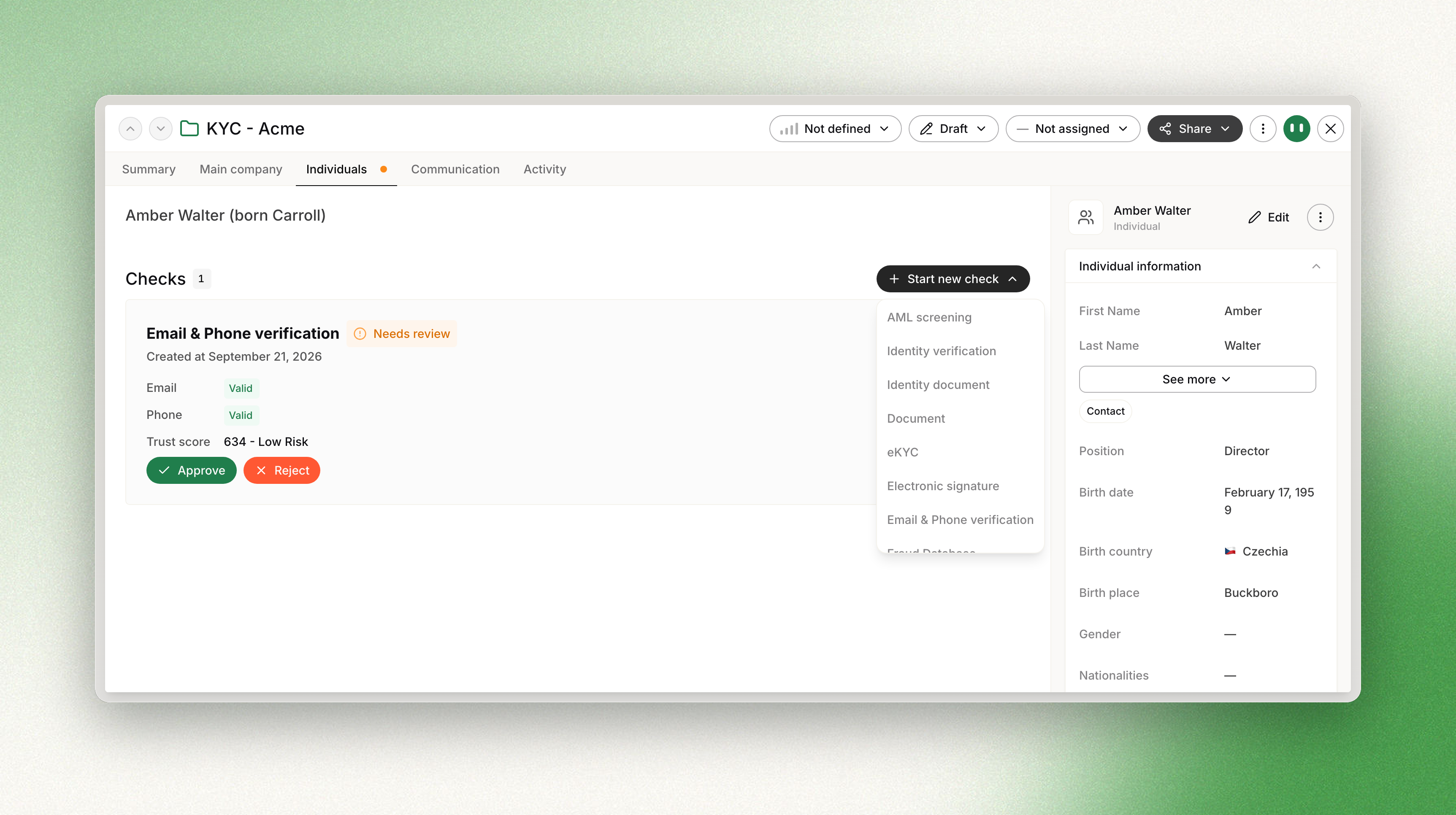
From any individual profile page, open Start new check and select Email & Phone verification. The entry is disabled when the individual has neither an email address nor a phone number.
A check reports on the contact details as they stood when it ran. Adding a phone number to an individual afterwards does not re-run a check that already passed on the email alone: launch a new check to cover the number.
API
The check has its own endpoints. The signals come back on the check data, grouped the same way as on the page: trust, fraud score, email verification, email validation and mobile validation. Every group is always present, and a signal the provider did not return is returned as null rather than omitted.
What gets verified
Email validation
| Row | What it tells you |
|---|---|
| Address valid | Whether the address is a valid, deliverable email address. |
| Bounce risk | How likely a message to this address is to bounce back, for example low. |
Email verification signals
| Row | What it tells you |
|---|---|
| Fraud risk | A risk level and the score band behind it, for example Review in the 601-799 band. |
| Mailbox existence | Reported only when the domain exists but the mailbox does not. The provider never confirms that a mailbox is real, so this row either reads Does not exist or is absent. |
| Email first seen | The date the address was first observed, for example February 27, 2015. A recently created address on an applicant claiming a long history is worth a look. |
| Domain first seen | The date the domain behind the address was first observed. |
| Domain country | The country the email domain belongs to. |
| Recent usage | How often the address has been searched recently and by how many organisations, for example searched 1 time in the last 7 days, by 1 organisation. This row carries no value of its own: it reports what the provider returned. |
Mobile validation
| Row | What it tells you |
|---|---|
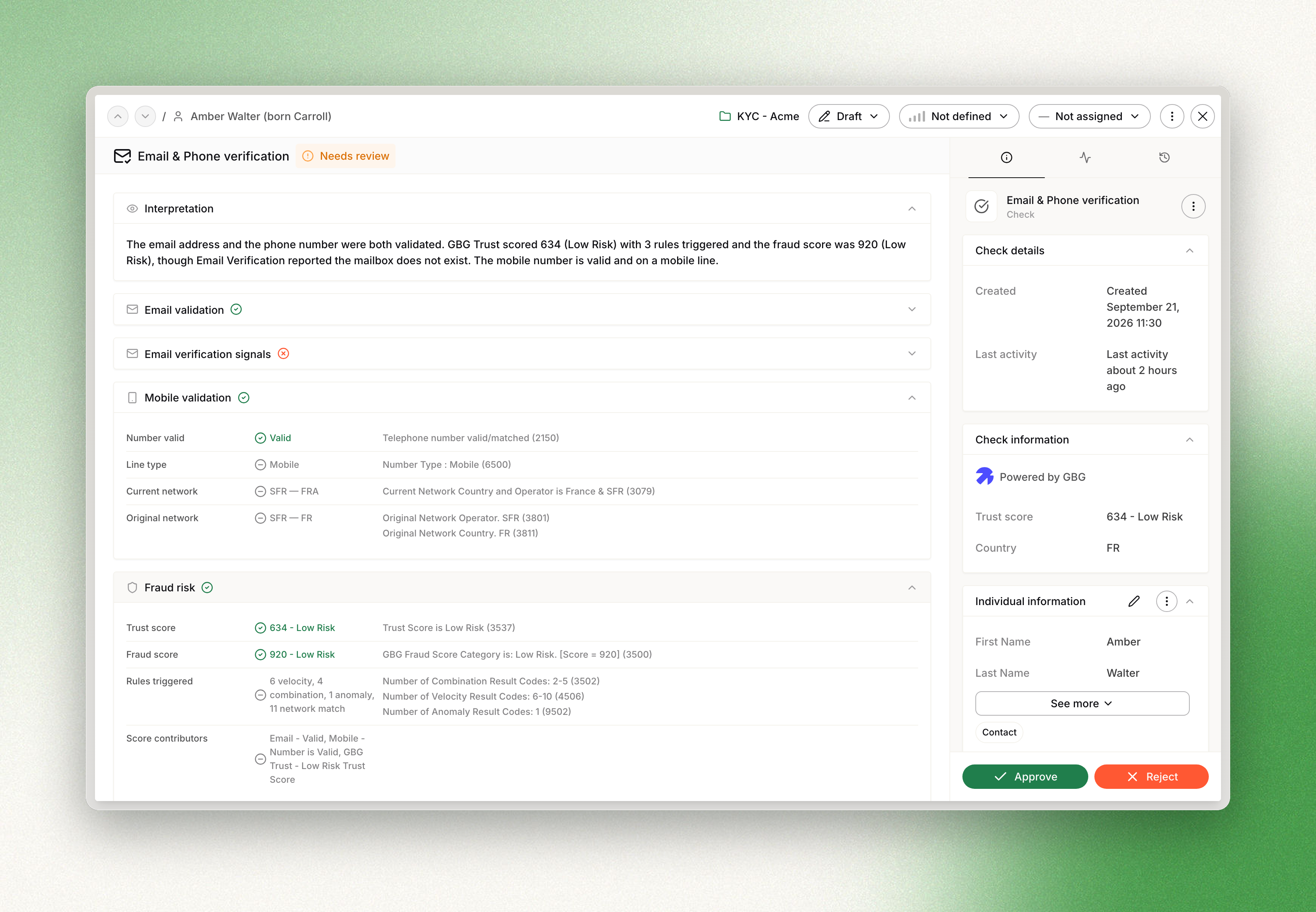
| Number valid | Whether the number is valid and reachable. |
| Line type | The kind of line behind the number, for example Mobile. |
| Current network | The operator and country currently carrying the number. |
| Original network | The operator and country the number was originally issued on. A difference between the two is a sign the number has been ported. |
Fraud risk
| Row | What it tells you |
|---|---|
| Trust score | The trust score and its band, for example 634 - Low Risk. It is built on how these contact details recur across applications and institutions. |
| Fraud score | The aggregate fraud score and its band, for example 920 - Low Risk. |
| Rules triggered | A count of the rules that fired, by family: velocity, combination, anomaly, network match and other. When none fire, the row reads No rules triggered. |
| Score contributors | The labels that fed the fraud score, for example Email - Valid, Mobile - Number is Valid. |
Velocity rules fire on how fast a detail reappears, combination rules on the same pairing seen across several applications (the same mobile number and email address together, for instance), anomaly rules on something unusual about the detail itself, and network match rules on a hit in the shared Trust Network.
Reading the results
Each row carries a status indicator, the value, and the provider result codes that produced it. A section header takes the status of its most severe row, and sections that carry a warning or an error are expanded by default, so what needs attention is what you see first.
Each of the four sections is in one of three states:
| State | What you see |
|---|---|
| Returned | The section renders with its rows, its indicators, and the result codes behind each one. |
| Not carried out | The provider received the item but could not run it because mandatory information was missing. The section says so and names the missing fields. |
| Absent | The section does not appear at all. Nothing was returned for it, so nothing is shown. |
On the individual, the check card summarises the outcome on three rows, Email, Phone and Trust score, each contact detail marked Valid, Invalid or Not carried out.
The email address and the phone number themselves are never displayed on the check, and the check does not store them. What you see are signals about them.
Decision logic
A verdict on a contact detail decides the check. A failed verdict is an address the provider reports as invalid, a number it reports as invalid, or a mailbox it reports as not existing:
| What came back | What happens to the check |
|---|---|
| A failed verdict on either detail | It is rejected when automatic rejection is on for the workspace, and sent to review otherwise |
| A passed verdict on either detail, and no failed one | It is approved when automatic approval is on, and sent to review otherwise |
| No verdict at all, because nothing ran or nothing was returned | It is sent to review |
Scores and bands never set the status. The trust score, the fraud score, the email risk level and the bounce risk are there for the analyst to read, not to decide, and an unfamiliar band is shown without a verdict attached to it.
Interpretation
An Interpretation card at the top of the check page summarises the signals in plain language, in a few sentences, for a reader who does not want to work through the result codes. It states what the provider reported rather than only the outcome, and it never presents a detail that was not verified as a finding. It is generated after the check and is best effort: when it cannot be produced, the check and its signals are unaffected.
Workspace settings
Settings, then Checks, then Email & Phone verification under Identity. Two settings apply to every check in the workspace, and can be overridden per check through the API:
- Automatic approval: approve the check when a contact detail passes, instead of sending it to review.
- Automatic rejection: reject the check when a contact detail fails, instead of sending it to review.
Which signals run is not configurable, and neither is any threshold or band: the bundle is fixed, and the country decides which profile applies. If you hold your own provider profiles and want the check to use them instead of Dotfile's, talk to your account manager, as that is switched on per workspace.
Billing
Each check is billed as one line, at one credit per check.
A check that never launched bills nothing. When the provider carried out no verification at all, nothing is billed; and when the provider cannot be reached, the check is not created and not billed, so the call can simply be retried.
Provider
GBG
Email & Phone verification is delivered by GBG, through the same ID3 Global platform that already powers the eKYC check.
The email and mobile signals come from GBG's international validation products, and the trust signals from a consortium network shared across GBG's member organisations, which is what makes a contact detail reused across institutions visible at all.
Updated 7 days ago