
Skills and Routines
Run a proven prompt with a slash command, and let a routine do the work while you are not there.
Introduction
Autonomy answers whatever you ask it. That is the strength of a chat, and also its limit: the answer is only as good as the question, and the good question you wrote last Tuesday is gone.
Skills and Routines close that gap from two directions.
- A skill is a proven prompt behind a slash command. Type
/case-reviewand you send a full review procedure, without having had to write it. - A routine is a prompt that runs without you, on a schedule, on an event, or on a call from your own systems.
One is for the work you are doing now. The other is for the work that should happen whether or not anyone opens Dotfile that morning.
Skills
Using a skill
Type / in the message box to see the skills and pick one, or click Skill to open the full library. Either way the command lands in your message. Add whatever else the run needs, attach a case with @, and send.
What the agent receives is the full procedure behind the command, not the shorthand you typed. So /case-review sends the instructions to resolve which checks are eligible, dispatch the AI reviewer on them in one call, then report what your policy decided and what it deliberately left to you. You can put several skills in one message, and write around them.
A skill runs with your permissions and under your workspace's AI Policies. It is a better prompt, not a wider set of powers.
The library
Twenty-six skills ship today, and the list grows. They sort into four families, and the shape of each family tells you more than the individual names:
- Cases work on the file in front of you: review it, brief it, chase what it is waiting on, refresh its company data, explain how it got here.
- Queue reads the workspace right now: what moved this week, how the load is spread, what nobody has picked up.
- Audits look back over a period and say where the work and the noise come from, with numbers.
- Configuration reads your setup rather than your cases, and names what is unused, misconfigured or switched off.
A sample, to give the range:
| Command | What you get back |
|---|---|
/case-review | The AI reviewer dispatched on every eligible check, then what the policy decided and what it left for you |
/case-brief | Where this case stands: what is done, what blocks it, and the single next action |
/chase-contact | Your contacts chased for exactly what is outstanding, with a portal link, and no duplicate reminder |
/refresh-company | Company data re-purchased and only the differences reported, flagged material or not |
/anomaly-check | What moved in this workspace recently: changes, not levels |
/screening-audit | What your AML screening produces, how much of it is noise, and which lever fixes it |
/automation-audit | What stands between your cases and automatic approval, ranked by the cases it holds |
/audit-my-setup | Your configuration read against your usage, and what is missing, unused or switched off |
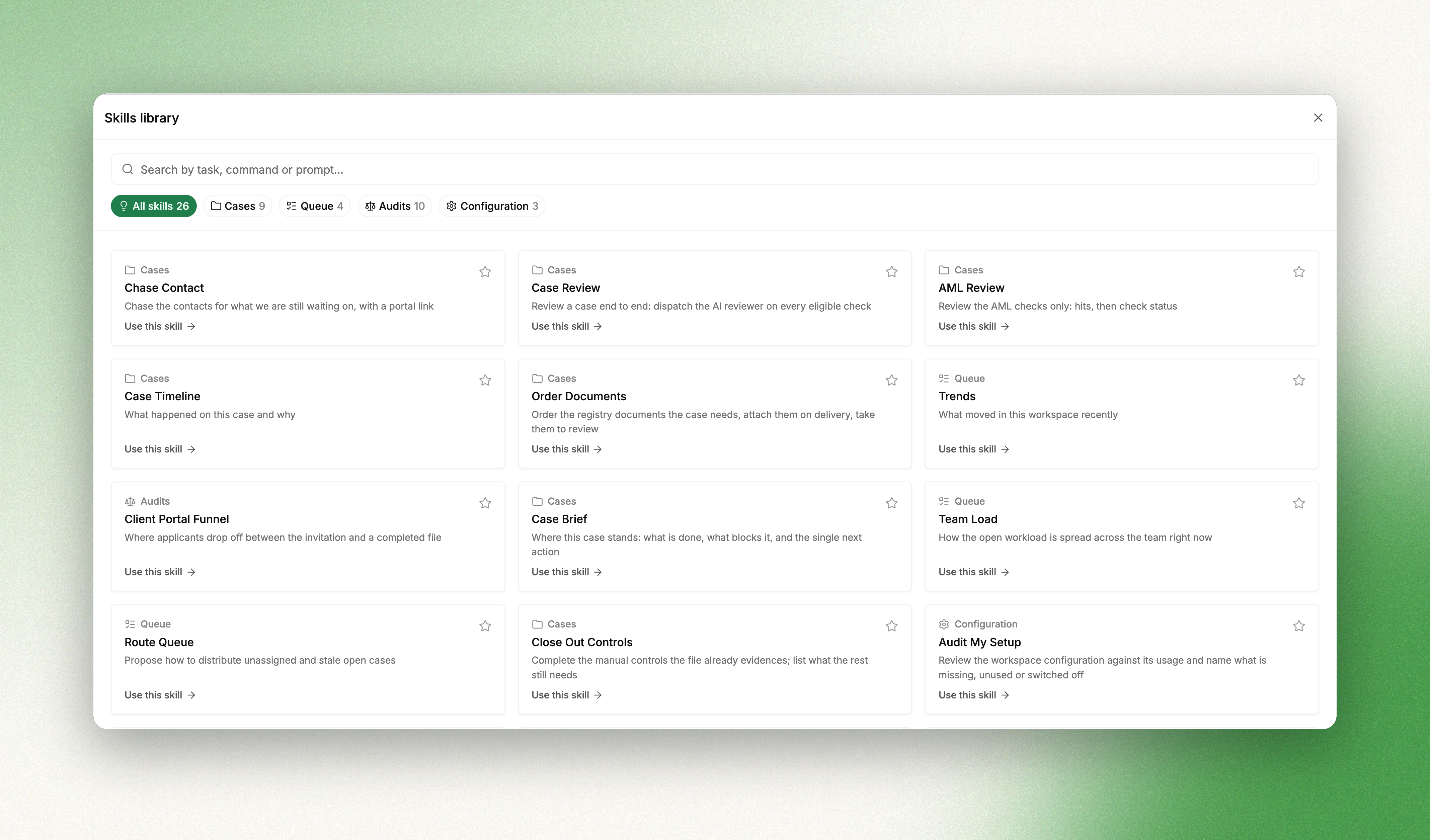
Search the library by task, command or prompt: the search reads the body of the prompt too, so expired or false positive finds the skills that deal with them even when the title says neither. Star the ones you use and they appear on the Autonomy home screen, ready in one click.
Routines
A routine is a prompt with a trigger. It runs on its own, all the way to the end, and leaves a run you can read.
The interesting ones are not reminders. They are the pieces of compliance work that are genuinely due and that nobody has time to start.
- The periodic review sweep. Find every case whose review is due or overdue, relaunch the checks it needs, write the review trail as a note so the timeline holds the evidence, and escalate the ones that need a person. Nightly.
- The lifecycle watchdog. Sweep the workspace for compliance work that has gone overdue and report it in one place, rather than discovering it at audit.
- The onboarding first pass. When a case is created, apply the right template and draft the risk analysis, so the analyst opens a file that has already been started.
- The client chase. Every morning, find the portals sent days ago with nothing submitted, and draft a polite reminder naming what is still missing.
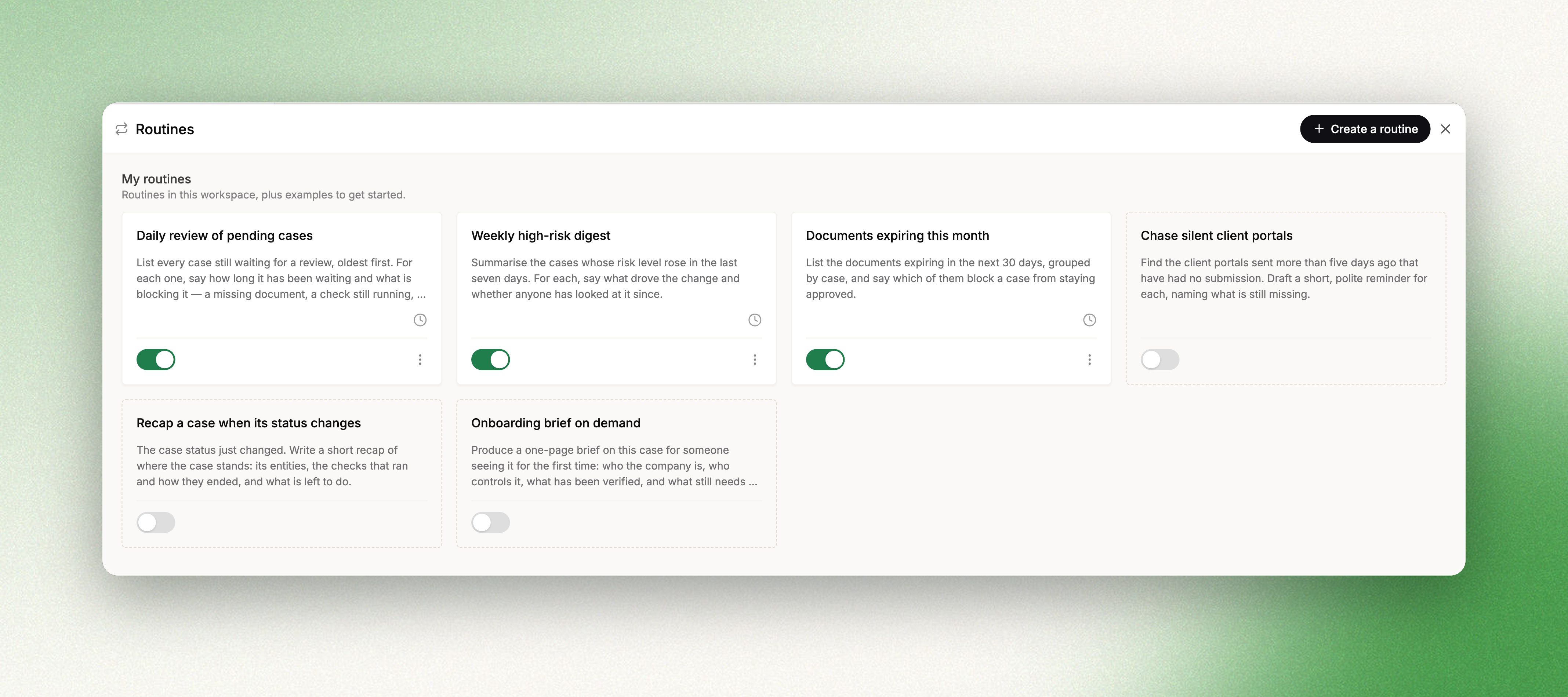
Open Autonomy from the Tools group in the sidebar: your routines are on the home screen, and the gear beside them opens the full list. Ready-made examples sit next to your own. Nothing about them is stored until you pick one, which opens the create form already filled in, and editing a draft is a great deal easier than facing an empty prompt.
Writing one
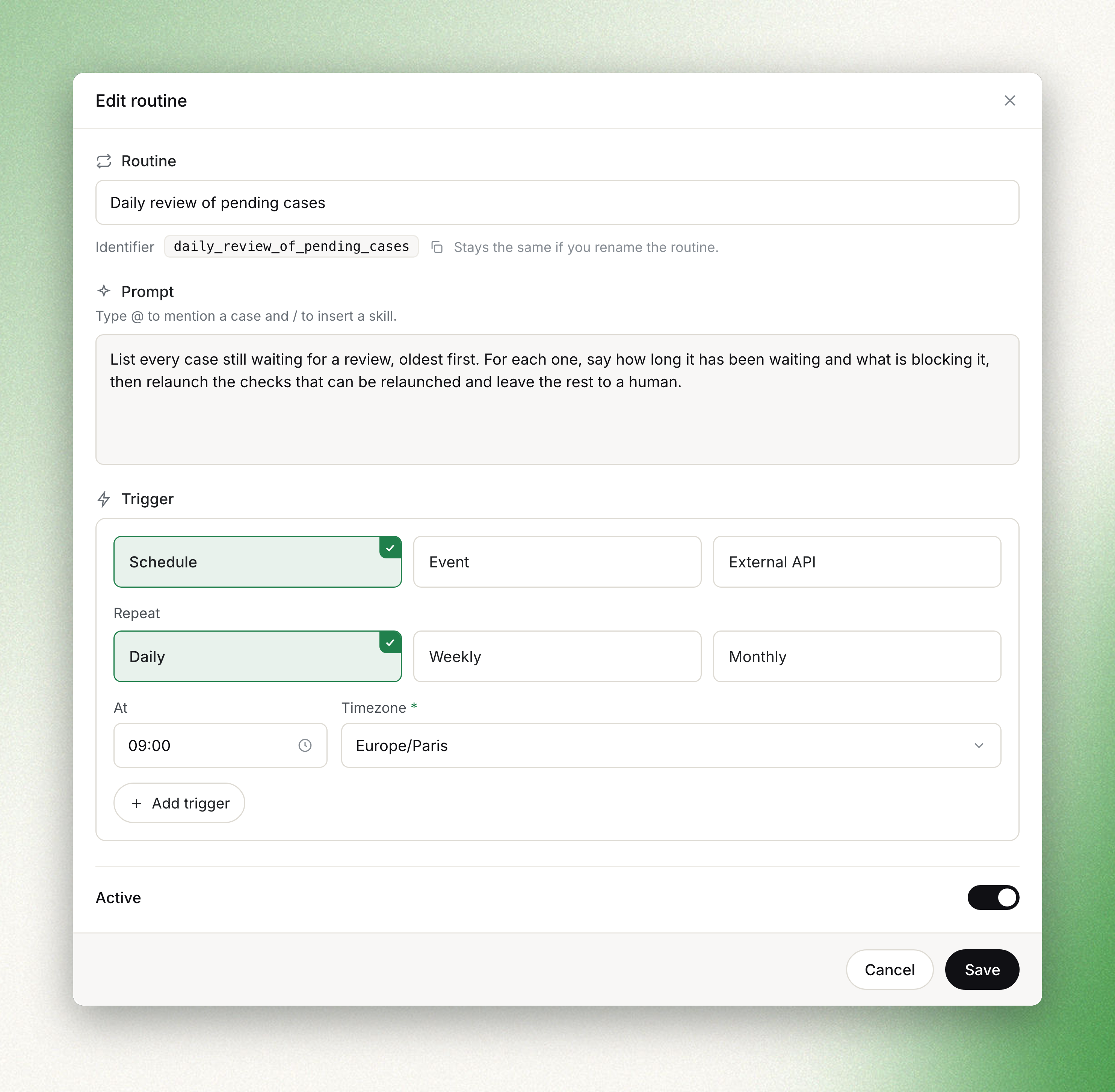
Describe what the agent should do each time it runs, the way you would brief a colleague covering for you. Type @ to mention a case and / to insert a skill, so a routine can be built on a skill rather than on a prompt written from scratch.
Then give it a trigger. A routine can carry several, of different kinds.
| Trigger | What fires it | What it is for |
|---|---|---|
| Schedule | Daily, weekly on the days you choose, or monthly, at a time in a timezone you pick | Sweeps and digests: the review backlog every night, expiring documents on the first of the month |
| Event | Something happening in your workspace, chosen from the same catalogue as webhooks | Reacting the moment it matters: a case is created, a status changes |
| External API | A call from your own systems | Putting the agent inside one of your flows, on the case you name |
You never write cron: pick the frequency, the days and the time, and the routine tells you when it will next run. Monthly schedules stop at day 28, because past that a routine quietly stops being monthly. The floor is one run every five minutes.
Events reuse the webhook vocabulary, so there is one list to learn for both. A routine can be Active or Paused at any time, without losing its history.
Watching it work
Every run is kept, with what fired it and how it ended, and opening one shows the whole transcript: the tools the agent called, what came back, and the report it wrote at the end.
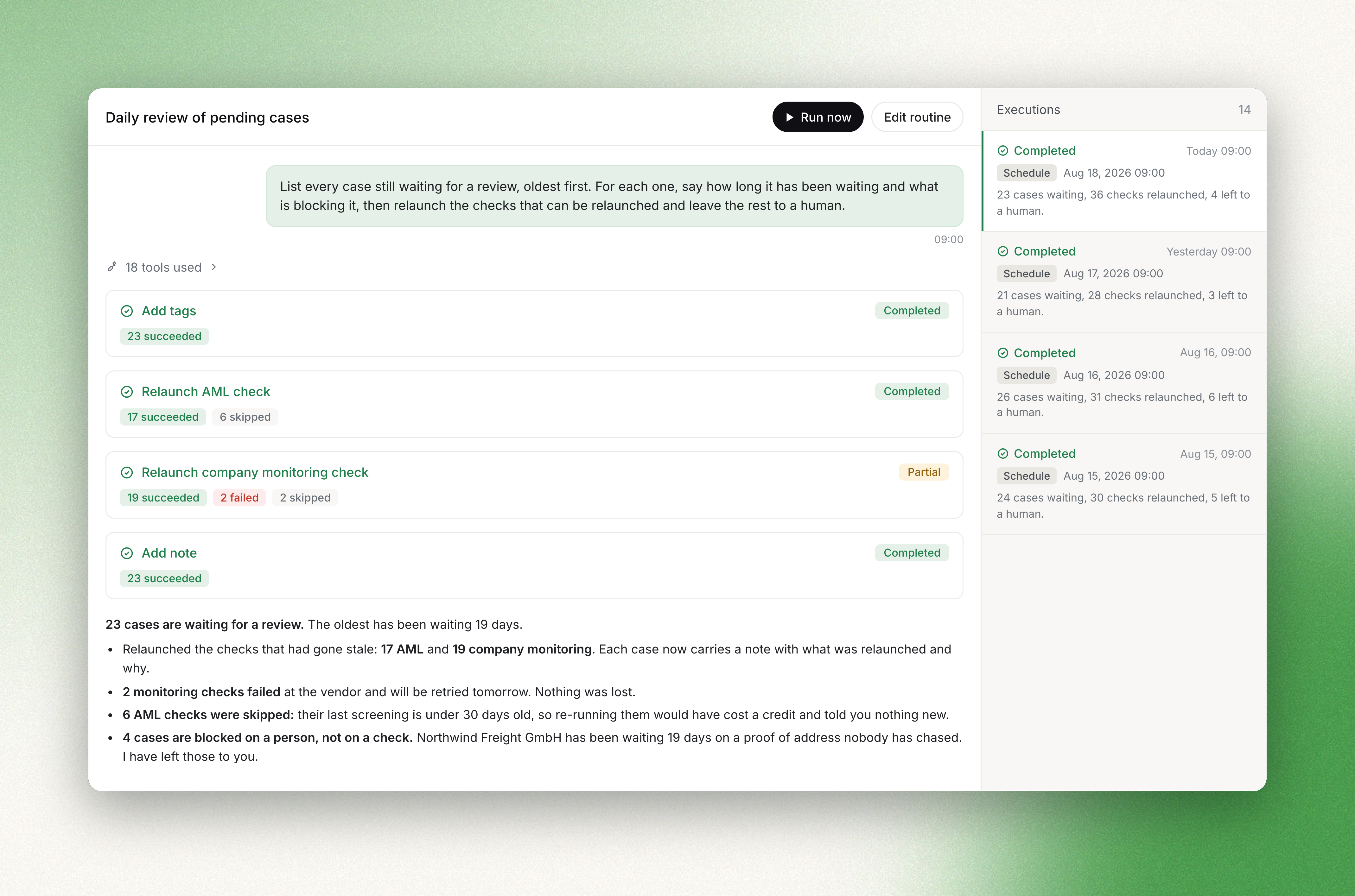
This is where a routine earns trust or loses it. A sweep that touched twenty-three cases tells you it touched twenty-three cases, which ones it skipped and why, and where it failed. You can also run a routine on demand from its menu, which is the honest way to try a prompt before putting it on a schedule.
Who can manage them
Routines have their own permissions, separate from the right to chat with the agent: view, create, edit and delete, set per role in your workspace settings. Members restricted to a space do not see them, because a routine runs headless and its prompt can reach beyond a single space.
Triggering a routine from your own systems
A routine carrying an External API trigger can be fired from your stack.
curl -X POST https://api.dotfile.com/v1/routines/{routine-identifier}/trigger \
  -H 'X-DOTFILE-API-KEY: <your-api-key>' \
  -H 'Content-Type: application/json' \
  -d '{"case_id": "<case-id>"}'
Send case_id to scope the run to one case, or leave the body out to run across the workspace. The identifier is generated from the routine's title and shown on the routine itself, next to a ready-made command; it does not change when you rename the routine.
The call returns as soon as the run is enqueued. The agent then works on its own, and the outcome comes back through the Autonomy run webhooks.
Availability
Skills and Routines are available in every Dotfile workspace, as part of Autonomy. There is nothing to enable.
Updated about 2 months ago